How to Choose the Right CRM for Your Startup
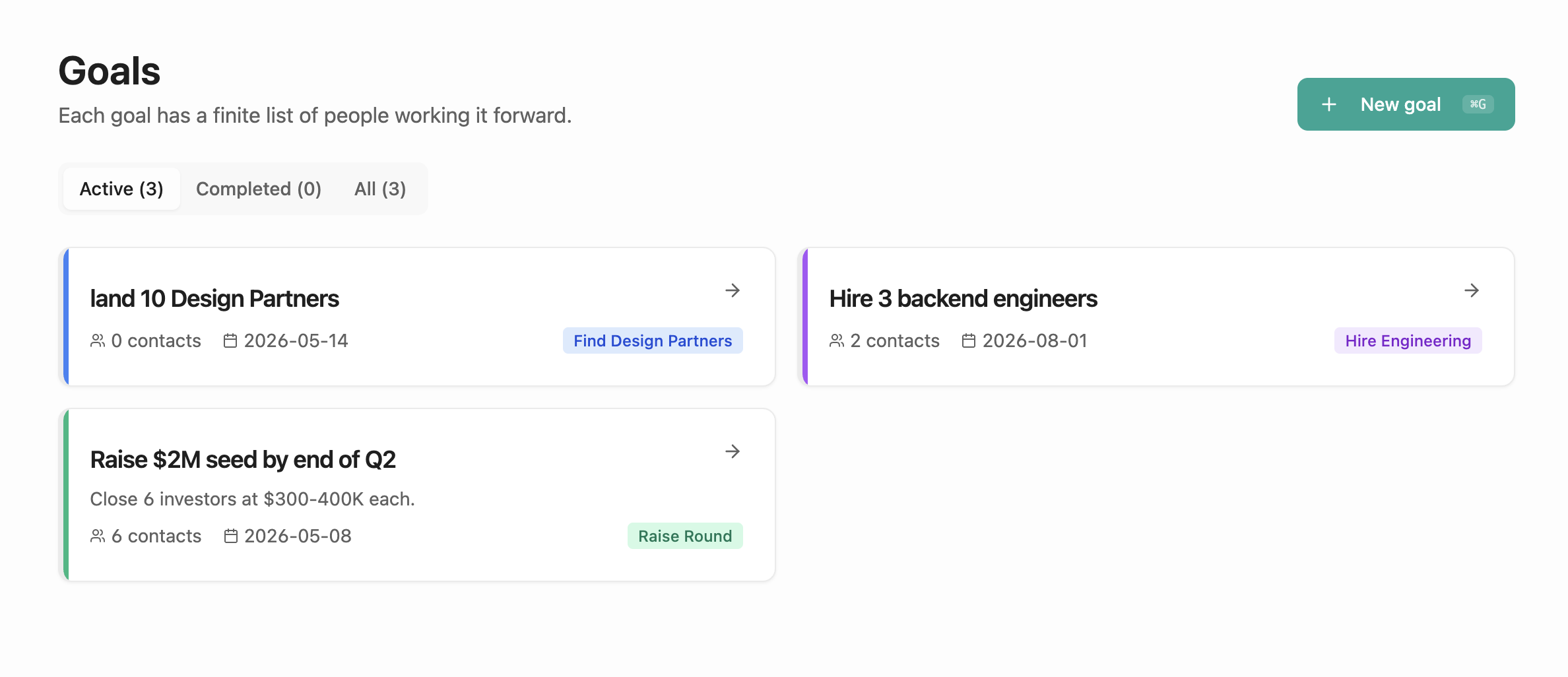
Every founder eventually asks the same question: which CRM should I use?The honest answer is that most CRMs were built for enterprise sales teams, not for the operator running fundraising, hiring, and customer development from the same laptop on the same day.
This guide is split into two parts. The first is a framework for evaluating any CRM as a founder. The second is a brief case for WorkToDo, the tool we built because the others didn't fit. Use the framework even if you ignore the recommendation.
A Founder's Framework for Picking a CRM
Score every CRM you're considering against these seven criteria. The right tool will hit at least five — anything below that and you'll abandon it within a quarter.
It fits your workflow, not a sales team's
HubSpot, Salesforce, and Pipedrive are pipelines first. You're not running a pipeline — you're running parallel goals (raise the round, hire the team, find design partners). A CRM that forces every relationship through a Lead → Qualified → Closed funnel will quietly distort how you think about your week.
Capture takes seconds, not minutes
If logging a coffee meeting requires opening the app, finding the contact, clicking '+ Activity,' filling four fields, and saving — you won't do it. After the third missed log, the CRM is already stale and you stop trusting it. Look for a tool where capturing a note is one tap or one sentence.
It gives you a reason to open it every day
Most CRMs are write-only data graveyards. A founder-grade CRM should have a daily Today view that tells you what's overdue, who's stale, and what's due this week — pulled across every active goal. If the homepage is just a search bar, it's a database, not a workflow.
It's organized around goals, not just contacts
Sarah might be an investor in your seed round AND a potential design partner for the new product. In a contact-first CRM she's one record with conflicting context. In a goal-first CRM she shows up under both goals with the right stage in each. This single difference saves more hours per week than any AI feature.
It stays updated without you typing
Read-only calendar sync, email parsing, AI voice notes — whatever the mechanism, the tool should auto-log most of your interactions. If keeping the CRM current is a separate task on your calendar, it has already lost. The right CRM updates itself between your meetings.
The pricing fits an early-stage company
Per-seat enterprise pricing is wrong for a 1–5 person team. Look for a free tier that's actually usable (not a 14-day trial in disguise), and a paid plan under $20/month for one founder. Anything north of that and the maintenance cost outpaces the value at your stage.
It runs on mobile as well as desktop
Half of your relationship moments happen between meetings — in the Uber, in the elevator, walking out of a coffee. If the mobile experience is a clipped version of the web app, capture won't happen there and your data will skew toward whatever you remember at the end of the day. PWA or native both work, but the mobile path has to be first-class.

Red flags to walk away from
- "Implementation" required. If a CRM needs a consultant or a multi-week setup, it's not built for someone running a startup.
- Sales-only vocabulary. Words like Lead, Opportunity, Quote, Account suggest the tool will fight you when you try to track candidates or investors.
- No daily output. If the tool has no notification, no digest, and no Today view, it expects you to remember to open it. You won't.
- DIY templates. Notion and Airtable hand you a blank canvas. The work of building the workflow becomes the founder's tax. A real CRM ships with the structure already in it.
Where WorkToDo Fits
We built WorkToDo because we ran the framework above against every CRM we tried — Folk, Notion, Dex, Airtable, HubSpot — and none of them hit five. Here's how WorkToDo lines up against each criterion.
Goal templates, not pipelines
Start a goal from a template: Raise a round, Hire engineers, Find design partners, Customer discovery, Sales pipeline. Stages come pre-defined. Contacts attach to goals with a stage on each. The same person can be on two goals with different stages — no awkward duplication.
Voice or one-line capture
Tap the floating widget, say 'Coffee with Sarah, send pitch deck Friday' for 10 seconds, and the AI extracts the contact, the action, the deadline, and attaches it to the right goal. Type-based capture works the same way. From thought to logged interaction is roughly 15 seconds.
A real Today panel and an 8am digest
The Today screen surfaces overdue tasks, due this week, next actions, stale contacts, and people you met recently — across every active goal in one view. Plus an email digest and a push notification at 8am so you never forget to look.
Goal-first by default
Every contact lives under one or more goals with an explicit stage. The cockpit shows you progress per goal (3 of 8 stages on 'Raise $2M seed'). When the goal closes, that workflow archives cleanly without breaking your contact rolodex.
Calendar auto-import and AI capture
Read-only Google + Outlook sync pulls the last 90 days of meetings and auto-attributes them to the right contacts and goals. The AI handles unstructured voice notes. The combination keeps the CRM current with effectively zero manual data entry.
Free during early access
The whole product is free right now. A Day 0 Founders lifetime deal is coming next for the first 50 people. After that, a single under-$20 founder plan — no per-seat enterprise pricing, ever.
Mobile-first PWA
The app is a PWA, so you install it from the browser and it lives next to your other apps. Voice capture, the Today panel, contact lookup — all first-class on mobile. The bottom nav has a center capture button so logging from between meetings is one tap.

A realistic founder week with WorkToDo
Monday 8:00am. Digest hits your inbox: three overdue items from last week's investor meetings, two contacts are stale (haven't been touched in 30 days), and your hiring goal has a candidate in "Reference check" who needs an offer letter.
Tuesday 11:00am. Coffee with a potential design partner. On the walk back you tap the capture button and say: "Met Alex Garcia at Acme, interested in piloting in Q3, send pricing Tue." Done. The AI files it under your design-partners goal, sets a Tuesday task, and attaches the note to Alex's profile.
Friday 4:00pm. You open the Today panel and clear five follow-ups in 20 minutes. Every relationship is current. You spent zero time "maintaining the CRM" — the calendar sync and the AI did that for you.
The Bottom Line
Picking a CRM as a founder isn't about features — it's about fit. Run the seven-criterion framework against whatever you're considering. If the tool you end up with hits at least five, you'll actually use it. If it hits fewer, you'll abandon it within a quarter and your relationship data will go back into spreadsheets, Slack DMs, and your head.
We built WorkToDo to hit all seven for founders specifically. It's free during early access — try it for a week against any other CRM you're evaluating.